
WordPress Navigation Bar
Many have asking me about how to add the top navigation bar to the WordPress like my blog. I was doing it manually by adding CSS and HTML code. To make it easier for general bloggers, I made the following WordPress Navigation Bar hack.
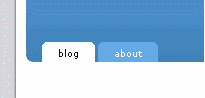
What it does?
Add a navigation bar under template header image. The navigation bar has a tab that link to blog URL and auto add WordPress ‘pages’ link tabs.
How to apply?
There are two ways to apply:
- Copy and paste the WordPress Navigation Bar code to the end of /wp-content/themes/default/header.php.
- OR, Easier method. Download the modified header.php, extract it to /wp-content/themes/default/ (replace existing header.php file).
Credits:
- CSS code ripped from BinaryBonsai
- Idea to use wp_list_pages() enlighten by Pool theme
Note: This hack is designed for WordPress default theme(kubrick) only. However, you may modify it as you want.
FAQ
- How do adjust the position of the navigation bar?
Simply modify the values of “top” and “left” under “#supernav”. - How to list Pages by menu order?
Find:
<?php wp_list_pages('title_li='); ?>
then, replace it with:
<?php wp_list_pages('sort_column=menu_order&title_li='); ?>
More details are available at WordPress Codex/wp list pages. - How do I add custom URL into the navigation bar?
Sorry, you can’t. The hack code only creates tabs based on your WordPress Pages.

I am the one asking for this in your forum…nice…..thank you very much
It’s a nice little hack, come in handy too.
Thank you for sharing. :)
seems like there is some thing going on here
Hello Liew Cheon Fong,
I have a question i use perm links same as you. But if i go to another page my bar disappear.
I believe i have to put the code somewhere else.
But where?
Please help my out here.
Thanks in advance.
Marvin
Put in header is fine. this hack is proved to work for WordPress 1.5.
Are you using my hack? Maybe you can show me your blog site?
nice-but it slides around if you resize the browser…
@mike: what did you mean by “slides around”? screenshot please?
resizing the browser-width wise-will cause the nav bar to slide off the blog page to the left. this was however, easily fixed by tweaking the css… mainly changing positive to relative.
http://fapomatic.com/9/sp3220050514152703.jpg
@mike: can you send me the tweaked css code please? the image is too small to view.
sorry- thumbnail
:lol:
here…
http://img180.echo.cx/img180/8669/sp32200505141527039je.jpg
well i don’t want to sound like someone who knows what they’re doing but all i did was change positive to relative, make a few adjustments in the position (i’m not using a top margin on the header for my site) and put the supernav div inside the header div…
if you want a look:
http://michaelschorn.com
@mike: you mean change “position” to relative instead of absolute? I will fix it. thank you. :)
yup, position-
and thank you for the great hack!
how come the mouseover function doesn’t work?
Can anyone teach me?
@8dee: are you using my hack? If you use your own css stylesheet, make sure you have write css style for mouseover(a:hover).
Got it…the hack you provide did not have the hover colour correctly.
but thanks you very much…..it looks great now.
did not?
@LcF
how would i go about making it so that if i create a tab that is [b]not[/b] a page but say, a link to a page in my root, that tab when active is white?
(eg: i’m using wpg2 gallery plugin which uses a page placed in root for embedding functions)
tia
@mike: this hack can’t do that and that is what I gonna do next. probably a plugin that allow user to add custom tabs. :)
cool thanks!
:wink:
Hehehe…I asked u about this before thru email…why didnt u reply, ah? ;)
– MENJ
@menj: probably put in ToReply list but forgotten. :P Sorry.
Thats okay :D
BTW, I installed your auto-ping PPS plugin and set my blog to “Simple Mode” but it will still not auto-ping :S Why ah?
– MENJ
@menj: you are offtopic already. have you check the wordpress 1.5 bug?
My website is http://www.jansenonline.nl using iis 6.0
If you can see on my website the bar disapear when you click on contact.
When i installed coppermine, I thought i use your bar also. But the bar is going 1px down dont know how that came.
Please help me out
Thanks in advance
Marvin
@Marvin: have you put the code in header.php? I read your source code and found that the navigation bar code is at the end of the page, it is not correct. You need to put the code in the end of header.php of default theme.
For coppermine, it works all right in Mozilla Firefox. I don’t know the coppermine theme you used. You need to tweak the css for IE.
Okay, lcf, thanks! :D
– MENJ
Hi,
I’ve just tried it, but is it only 1 link? how to make it has many links just like yours there. “home”, “archive”, “forum”, etc…
thanks
what the hack do is create top navigation tab links for “Pages”. Create an “archive” page then you will get a “archive” tab, and so on.
For this blog, I manually create all the tabs. I am not using the hack.
I would like to change “blog” by “home” in the bar
thanks
@Derleth: in the hack code, look for “blog” and change it to “home”. :)
thanks , :)
a kiss
Hey, whats the code for it on the 3 column kubrick theme like you have on this site? I am using the same theme here: http://foxscorner.com
Thanks
you mean the navigation bar or the 3 column kubrick theme?
You can check my source for the code and CSS. I am not using the navigation bar hack in this blog.
I am looking forward to having this in my blog
LcF – Totally fantastic hack, my friend. This is exactly what I was looking for. I had it up and running, and working with my own custom CSS in minutes. Thank you very much!
The only thing I would add to the funtionality is a way of handling subpages. So far I dont’ see any way that subpages integrate into your code. I’m not sure how I would do it on my own blog, but If I get something up and running I’ll post another comment.
Thanks again!
thank for the info fren.
I don’t think that what’s been said above is a truth. :( Doesn’t sound real…
liew, i’ve discovered a problem with your hack bar: when added with more links, [i’ve got 7] check out the right most one: it looks a bit strange. :) why?
thanks
stchatterbox: it has nothing to do with the nav bar hack. Edit style.css, look for the style for “hack”. Increase the width of it. ;)
oh, thanks a lot, Liew, I’ve made it up so perfectly.! :)
Any progress on turning this into plugin? I would also like to add a link that is not a wordpress page.
I hacked the code to get it to include the tab, but obviously it is always coloured white… which is a little annoying!
As you don’t actually use the hack could you let me see your header.php file so I could work out how to manually edit my own…
Cheers
Andy
The links in the navigation bar are sorted alphabetically. How can I change that? Ich want to have one link on the right (Impressum) and the rest sorted alphabetically. Thx in advance.
Is there anyway to make the text in the tabs the correct case. When I type “Contact” is shows up as “contact” in the tab.
Thanks! It’s a great navigation bar.
Is there a way to make the navigation bar display categories instead of pages?
I found an interesting way to display your navigation bar and I decided to use the temaplate based on your 3 column kubrick layout.
A categories navigation bar instead of pages would be great!
http://www.rawgreed.com
Hi,
I am presently running a MT blog and planning to MIGRATE to WordPress.
I am testing your hack on my localmachine and everything is working perfect. Excellent hack and thanks for that.
I have a question.
I am using the “Static frontpage Plugin” by Denis de Bernardy.
So I have created a PAGE called HOME, where I will be creating a static content page as the face of my blog.
Now when I install your hack in header.php, I see TWO links in the tab navigation:
“blog” and “home”
Is it possible to exclude some PAGEs from displaying in the TAB navigation?
or you might have a different suggestion for me here :)
Thanks and looking forward to a reply.
Andy: in the code, delete the line:
text-transform: lowercase;To use show categories, simply change the wp_list_pages to category template tag.
Sajid: you may exclude some pages. Please check the template tag parameters for wp_list_pages
Thanks LcF
I changed the code to this:
and it works perfectly now :)
hi,
i am back with a question.
I have integrated your tab navigation on my site (which is still in testing phase so the links point to “localhost”)
http://www.ssdesigninteractive.com/ssdesign
The question i have is about the layout. If you see, there are 4 tabs at the top, the fourth one “contact” is not showing properly at the bottom, there is a cut in the design at the bottom.
This cut is seen only in Firefox browser. If i se it in IE, it shows correctly (ofcourse without the rounding of the edges.)
Can you guide me as to where might be the problem?
Hi,
I solved it.
The problem was with the CSS for “hack” div.
The width specified was 450px ans my tabs were extending further then 450px.
I increased it to 650 and its fine now.
Hi Liew,
I tried changing the page tag to the category tag. It works ok, but now I am having a new problem. When you click a category the navigation bar does not correctly highlight the new category. The highlighted tab is always the blog tab. It doesn’t seem to follow where you click correctly.
Maybe you can see it. This would be so great if I could use it with categories and have it highlight correctly.
Andy: the tab highlight is made possible by the custom CSS class generated by the wordpress list pages function. The wordpress list categories function does not generate custom CSS class.
There are workarounds, anyway.
If you know PHP coding, read http://codex.wordpress.org/Dynamic_Menu_Highlighting
Or, try the catHighlight plugin.
And again: How is it possible to change the order of the tabs? I don’t want them to be sorted alphabetically.
Hi Liew!
Thanks for this hack!
I gotta a question. The links in the navigation bar are sorted alphabetically. How can I change that? I tried to change in the header ‘title_id’ by ‘sort_column=menu_order’ but it didn’t work. actually it worked but the alignement wasn’t right
didier: so it works. about the alignment problem, please show us a screeshot of it.
here you can see the problem
http://www.deiaco.com/~desfayes
please help me! :-)
LcF I love the hack but something just aint working right…. I have some weird white bar just stikin out at u on top of the tabs and the mouseover dont work… :S
Great Hack! Thank you very much for your work!
Greetings from Switzerland
benz
If any of you have a working example of dynamic highlighting for a category list, could you please share it? I’m not understanding the right approach to use for categories. Thanks much.
How can I style the font on this hack to an tag??
oops I didn’t quote it > I wanna sttyle it with a “” tag
jeezus it won’t display its a – header 2 tag … > h2
good
i was wondering the same how to change the hack to a tag might just be me been a noob but cant get my head round it. any ideas?
How can we list these pages by menu order?
Please help!
@A.C.: I updated the entry for “sort pages by menu order” (FAQ).
Hi liew i downloaded your hack; I’am totally blind to programming;
Could you tell me how to add links to the nav bar apart from my blog pages?
No, the hack does not support custom URL
Hello Liew,
Is this hack works under WordPress 2.0 ?
Thanks.
Is it just at my end but once the hack is installed all pages loose the sidebar background color on the default theme?
@oomoney: the hack should work under WordPress 2.0 too.
@Alex: this is weird. the code does not modify theme’s background.
hmm, i only changed the header image, if you look at my site: http://www.kentdome.com/wp/ notice the SIDEBAR has a gray background – now clicking any of the TOP NAV links will result in the page load but notice the sidebar is now WHITE, i have not changed any CSS. Additionaly even if one clicks on the SIDEBAR pages menu after the hack is installed the loaded pages sidebar background is white. Any ideas?
revert to default theme (the original unchanged theme) and apply the hack again?
no luck, redownloaded WP2 just in case, tried the original unchanged theme and reapplied the hack but same result, sidebar looses background color. Maybe this is by design ?
I am kinda over it but got it working now, using the new kubrik fixed theme, and cut some of the background images. But thanks for your work
Dear LcF,
can you give me a hint, why my content has shifted down some px after changing position of the navigation bar from “absolute” to “relative” ? It doesn’t look nice like that :-(
many thanx
Livio, Zürich
@Livio: you can adjust the top, left, margin values of #supernav to re-position the navigation bar. It is a matter of trial and error.
sorry LcF, you got me wrong:
The navigation bar sits at the right position. My Problem is, that the blog contents (means: below the bar) shifts down some px (about 8px) after changing to “relative” positioning :-( thats what I mean…so there is more space between the header and the content now…did you encounter such problems before?
Thanx Livio
Here’s a workaround for all the people who want to put custom URLs in the navbar:
– Create a new page. Name it whatever you want the link text to be.
– Create a redirect on your server (for me there is a control panel option at my web host’s site to do this), so that any calls for the page you created are instead redirected to your chosen url.
Great little navbar – exactly what I was looking for. However I want the navbar page order to be different – is there a hack that will ensure it uses WordPresses page numbering system?
Ive used this code hack in my Default template sidebar.php:
Pages&sort_column=menu_order’ ); ?>
which ensures my page list on the right follows my order (set in manage pages > edit > page order) – but I need the top nav to follow suit.
If anyone can help. thanks in advance
James
also how would I go about changing the font/size of the text in the tabs?
Thanks
J
one final question – I notice that when this navigation bar is running that the grey panel on the right dissapears on all the static pages, and is only visiible on the blog homepage. Is this a known issue?
For people using the default (kubrick) header I use -20px and “relative” and it seems to work fine for me (www.pudweb.com). i.e.
#supernav {

	font: bold 9px/9px Verdana, Lucida Grande, Arial, Helvetica, Sans-Serif;

	position: relative;

	top: -20px;

	left: 50%;

	width: 720px;

	margin: 0 0 0 -360px;

	padding: 5px 16px; /* duplicate the tab size */

	text-align: left;

	display: block;

	}
I have also tweaked the PHP highlighting code so that it works (a little better) with the WPG2 (WordPress Gallery2) plugin by changing header.php
<div>

<ul id="supernav">

<li class="<?php if (( (is_home() ) && !(is_paged()) && !(strstr($_SERVER['PHP_SELF'], ' wp-gallery2.php'))) or (is_archive()) or (is_single()) or (is_paged()) or (is_search())) { ?>current_page_item<?php } else { ?>page_item<?php } ?>"><a href="<?php echo get_settings('home'); ?>">blog</a></li>

<?php wp_list_pages('sort_column=menu_order&title_li='); ?>

</ul>

</div>
Any chance to get this running with subpages enabled? Using depth=1 will totally f*ck up the menu… :(
It was awesome, a big thanks for you!!!
After nights of constraction, its work perfectly now…
Again, Thanks for your contributions!
This is a awesome hack.
I tried it but I wanted it shifted to the right instead of the left but it’s not working correctly.
I know nothing about .php. Would someone help me with this?
http://www.thepodcastreview.com/
It’s gotten worse.
It looks fine now in Firefox on my Mac but it is way off in Internet Explorer on Windows.
And, for some reason, I now have a a line through my blog title in Firefox but not in Internet Explorer.
I’m freaking out!
UPDATE:
Ok, it looks fine now in Firefox on my Mac but it’s still screwed up in IE on Windows.
HELP!
UPDATE again:
it’s not browser specific nor OS specific, it’s resolution specific.
I am view the site on different computer with different resolutions, it’s not standard.
Is there a way to fix this so that it is standard no matter what resolution you view it?
Hi Liew, I’m using your plugin and it works great. Im trying to incorporate a wordpress store plugin, but when i do it creates extra pages in the header. Now, i realize that is the problem of the other plugin not yours, but is there a way to make pages that do not display in the nav bar. i think that would help things out a bit.
Liew! Your code rocks as usual. Simple, purposeful! Thanks! B
Liew, actually you can put an url in your navbar yourself. Pick one you like and code like this:
">/wordpress/wp-content/plugins/falbum/wp/album.php">photosYou see? Easy like cake…
Liew can you help me with something else about the navbar? It looks like the ‘hack’ bit in the CSS shoves my theme a bit around. I see a 2 pixel high white stripe at the bottom of the footer. Why I wonder?
Martin,
If you change the ‘2px’ below to ‘0px’, that white stripe will no longer show up. I had the same issue on my site.
#hack {
background: white;
height: 2px;
Hi it simple but great tutorial. thanks.
I always mess things up when I try to hack my wordpress. I’ll give this a try…thanks a lot for the tute