
Auto Ping PPS from WordPress 1.5

Since the site is upgraded to WordPress 1.5 and the core code changed, here is the updated guide to auto ping Project Petaling Street (PPS).
For previous WordPress version, please refer to Guide to ping PPS from WordPress. It works on WP 1.0 / 1.2.
We need to edit two files in WP_ROOT/wp-admin:
- edit-form.php – Simple controls post editor
- edit-form-advanced.php – Advance control post editor
Important: Backup the files before continue.
Simple controls post editor (edit-form.php)
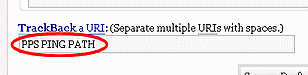
- Open edit-form.php for edit.
- Goto line #56, where it read:
[html][/html] - Replace the line with:
[html][/html] - Save and upload edit-form.php. Done.
Advance controls post editor (edit-form-advanced.php)
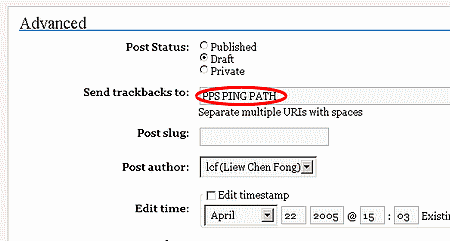
- Open edit-form-advanced.php for edit.
- Goto line #27, where it reads:
[php]$form_trackback = ‘‘;[/php] - Add following code ABOVE the line:
[php]if($to_ping == ”) $to_ping = ‘PPS PING PATH’;[/php]
So that it looks as follow:
[php]if($to_ping == ”) $to_ping = ‘PPS PING PATH’;
$form_trackback = ‘‘;[/php] - Save and upload edit-form-advanced.php. Done.
Note: Replace PPS PING PATH with provided ping URL when you register to PPS.
Thought:
Hope this helps Malaysia bloggers who are using WordPress 1.5 (or later?) to easily ping PPS, and increase blog traffic. Of course, you can remove the PPS ping URL when you do not want to ping PPS for certain post. :)



THANK YOU!!!!!!!!!!!!!!!!
hey liew…i was wondering, im using wp1.5 as well…do i need to register as a member to auto ping? previously i had an account in pps and it is meant for blogspot…can i use back same account or i must register a new one? for wp1.5 like you and me…i changed edited the 2 files but whats next? do i need to go to pps and send them an email saying that i want to auto ping and do we need to wait them to approve us?
nice work, and i was wondering why i can’t ping to PPS as i was using the old auto PPS ping method.
Kahsoon: you can use your current account and no, no need to send Aizuddin an email. just ping all you want. you can also ping to the test site of PPS if you’re not sure.
That would explain why the ping only worked once. Now I can use this to ping all the sites.
Thanks a lot man, makes perfect sense now.
How come i edited the file but still when i publish a post my entry wont appear in pps???
pls double check your code, and refresh pps.
i dont understand the last part. Note: Replace PPS PING PATH with provided ping URL when you register to PPS. what is the provided ping URL?
nvm i got the ping url already lol….just want to know if everyone’s ping url is the same?
Yes, everyone’s ping url is the same. Please keep the url private.
whats the diff btw this and old method ?
by using the old method it only wont work when you default post method is advance ?
@AhKnight: ya, there are code different in advance mode. the theory is still same though.
LCF, instead of hacking into WP, can someone write an auto-pinger plugin instead?
– MENJ
good idea. I wonder WP has the hook for trackback field or not…
i just wonder why pps is using trackback but not pinging ?
I am working on the plugin but get stucked in adding ping url in advance form.
PPS is using MT blog trackback function.
Works great. Thank you very much mr. Liew. :)
Great stuff.. Just to say thanks that finally I got to ping back to PPS.
Cheers! :)