Download Free Windows 8 (Developer Preview)
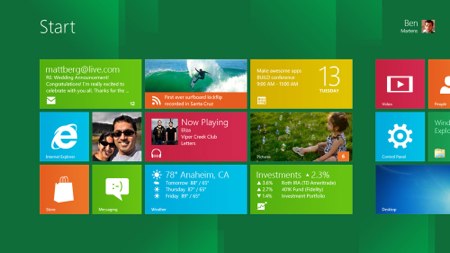
Now you can download free Windows 8! Microsoft has released Windows 8 Developer Preview for free download. You can download it online on Windows Dev Center. No torrent needed. No MS LiveID needed.
Read on for more information about Windows 8 developer preview downloads.
What is Windows 8? Developer Preview?
Windows 8 is the codename of the next version of Microsoft Windows, a family of operating systems produced by Microsoft for use on personal computers, including home and business desktops, laptops, netbooks, tablet PCs, servers, and media center PCs. It adds support for ARM microprocessors in addition to the traditional x86 microprocessors from Intel and AMD. Its user interface has been changed to make it better suitable for touchscreen input in addition to the traditional mouse and keyboard input. — WikiPedia
Windows Developer Preview is a Pre-Beta version of Windows 8 for developers. It is buggy, not stable, no support, and should not be used in a production environment.
In short, install Windows 8 developer preview at your own risk!
Download Windows 8 Developer Preview
There are 3 different Windows 8 developer preview versions: Windows Developer Preview with developer tools (64 bit, 4.8 GB), Windows Developer Preview (64 bit, 3.6 GB), and Windows Developer Preview (32 bit, 2.8 GB). Each download is a ISO disk image file. You need to burn ISO into DVD before install Windows 8.
Comes with developer tools
Windows Developer Preview with developer tools, recommended for Windows developers, includes the following extra:
- 64-bit Windows Developer Preview
- Windows SDK for Metro style apps
- Microsoft Visual Studio 11 Express for Windows Developer Preview
- Microsoft Expression Blend 5 Developer Preview
- 28 Metro style apps including the BUILD Conference app
Windows 8 system requirements
If your computer hardware is working fine with Windows Vista and Windows 7 then it probably works fine for Windows 8 too. Windows 8 requires at least 1 GHz processor, 1 GB RAM, 16 GB disk space.
Clean install? Upgrade?
Windows 8 Developer Preview with developer tools only supports clean install. It wipes off existing Windows before installation. Windows 8 without developer tools can keep your accounts, files and settings. If you are installing on Windows XP, only accounts and files are kept. You cannot uninstall Windows Developer Preview.
Visit Windows Dev Center for more infomation.